




WordPress auto blogging systems and setup — The Complete Guide works when you need a site that publishes steadily without hand-writing every post. It is a…
Last updated: October 11, 2026
Key Takeaways
- WordPress auto blogging is an automated publishing pipeline, not a shortcut to effortless traffic.
- The best setup depends on your source, your workflow, and how much control you need.
- Build it by connecting a source, setting posting rules, and testing drafts before anything goes live.
- Copyright, editorial purpose, and scale change the setup dramatically.
WordPress auto blogging systems and setup — The Complete Guide works when you need a site that publishes steadily without hand-writing every post. It is a poor choice if your plan is to copy feeds, scrape articles, and cross your fingers for search traffic. In practice, the better setup is controlled: use content you are allowed to use, filter it, rewrite or summarize it with human review, then send only the right pieces into WordPress on a schedule.
What WordPress auto blogging actually is

WordPress auto blogging is an automated publishing pipeline, not a magic traffic machine. Populate a niche site, aggregate your own team’s updates, or syndicate approved content from a feed? Then auto blogging can save hours. Copy other sites? The answer flips fast. That route invites copyright, quality, and SEO trouble that is hard to clean up later.
Honestly, the clearest model is this: four pieces, one chain — source, rules, transformation, publish. The source might be an RSS feed, a JSON API, a newsletter archive, or a product database. Rules decide what gets in. Transformation rewrites, trims, tags, or formats the material. Publish sends the result to WordPress through the REST API, XML-RPC, or a plugin.
A basic build can use WP All Import, Feedzy RSS Feeds, or WP RSS Aggregator. A tighter build relies on Make, Zapier, n8n, or a custom script plus the WordPress REST API. The second route needs more setup; the payoff is finer control over duplicates, category mapping, featured images, and scheduling. Worth the extra work? Often, yes.
If you are building a site that must look thin, robotic, or generic, stop here. Auto blogging magnifies weak strategy. Directory, news digest, internal knowledge hub, or affiliate comparison site with real filtering? It can be practical.
Quick check: If the content source is legal, structured, and repetitive, auto blogging may help; if the source is questionable or messy, it will probably hurt you.
Which setup is right for your site?
Your setup depends on where the content comes from and how much control you need. Pulling in RSS items and displaying them neatly? A plugin-only setup is enough. Need custom fields, enrichment, duplicate checks, scheduled publishing, and selective rewrites? Then a workflow tool or custom integration is the better path.
| Situation | Best Path | Why Other Options Fail |
|---|---|---|
| You want to import 1–3 RSS feeds into WordPress | Feedzy RSS Feeds or WP RSS Aggregator | Custom scripts are unnecessary overhead; full automation tools are more work than the job needs |
| You need to map CSV or XML product data into posts | WP All Import | RSS plugins do not handle structured imports well |
| You want AI-assisted rewrite plus human approval | Make, Zapier, or n8n feeding WordPress drafts | Direct auto-publish can produce low-quality pages too quickly |
| You need high control over dedupe and rules | Custom script + WordPress REST API | Off-the-shelf plugins often break at scale or hide logic you need to inspect |
| You are curating news or niche commentary | Aggregator plus manual review | Full automation can flood the site with near-duplicate posts |
| You are publishing copyrighted articles from other sites | None; do not do this | The technical setup does not solve the legal problem |
When in doubt, I would pick the smallest system that still enforces a useful rule set. A 2-plugin stack is usually safer than a 6-tool chain. One importer and one editorial review tool is easier to live with than an RSS parser, a rewrite tool, a scheduler, a tagging service, and a media downloader all stitched together.
Here is the decision path I would use.
- List the source type first: RSS, API, CSV, XML, scraped HTML, or human-written drafts.
- Decide whether you need drafts or published posts. Drafts are safer; auto-publish should be the exception.
- Choose the import method: plugin, automation platform, or custom code.
- Map the data fields you actually need: title, excerpt, body, tags, author, date, image, source URL.
- Set your duplicate rule: exact match, similarity match, or source blacklist.
- Choose a review step if the posts can affect money, trust, or compliance.
- Test with 5 to 10 items before opening the faucet.
The most common mistake is starting with a plugin and only later asking where the content comes from. That reverses the order. Source quality drives everything else. Garbage in, garbage out — and that math stops working fast.
If your content can be represented cleanly in a 10-column spreadsheet or a structured feed, import tools fit. When judgment is needed — news angles, opinion, and the like — automation should stop at draft creation.
Quick check: If you can describe your source in one sentence and your output in one template, you are ready to choose a setup; if not, the workflow is too vague.
How do I set up auto blogging in WordPress?

Set it up by connecting a source, defining posting rules, and testing the output in drafts before anything goes live. Want the shortest path? Use a feed plugin. Want control? Pair WordPress with an automation platform. Want maximum control and fewer surprises? Use the REST API with a custom script.
Here is the practical setup path for a standard feed-based system.
- Install WordPress on a host that gives you control over cron jobs and PHP limits. Managed hosts often work fine, but check that scheduled tasks run reliably.
- Install an import plugin such as Feedzy RSS Feeds, WP RSS Aggregator, or WP All Import, depending on your source.
- Add the source feed or file and verify that the title, date, body, author, and image fields are recognized correctly.
- Set the import frequency. For a news-style site, 15 to 60 minutes is common; for slower sources, once or twice a day is usually enough.
- Map categories, tags, custom fields, and featured images. If the plugin cannot map these cleanly, stop and reassess.
- Choose whether posts become drafts or publish automatically. Drafts are the safer default, especially on a new site.
- Run a test import with 5 items and inspect the posts on the front end and in the block editor.
- Turn on duplicate checks, source attribution, and any canonical or noindex settings your SEO plugin supports.
- Schedule a regular audit, at least weekly, to check broken feeds, layout issues, and stale imports.
The reason this order matters is simple: feed systems fail quietly. A feed can keep importing while the content becomes empty, duplicated, or malformed. You do not want to discover that after 300 posts.
For setup tools, I would group the options this way. Use Feedzy RSS Feeds or WP RSS Aggregator for RSS aggregation. Use WP All Import for CSV or XML. Use Make, Zapier, or n8n if you need branching logic or AI enrichment. Use the WordPress REST API if you want to build your own pipeline or avoid plugin lock-in. For many sites, the REST API plus a lightweight automation layer is cleaner than stacking several WordPress plugins.
One detail a lot of generic guides skip: your web host matters. If scheduled imports are delayed, check WordPress cron behavior. Real cron on the server is more reliable than traffic-triggered pseudo-cron for sites that do not get steady visits.
Quick check: If your feed works in a test run but breaks on schedule, the problem is often cron, limits, or field mapping — not the plugin itself.
The 3 conditions that change everything
Auto blogging works very differently depending on copyright, editorial purpose, and scale. If any one of those shifts, the setup should change too. Ignore that, and the system becomes a liability.
First, when source content belongs to other publishers, I would not build an auto blog around copying full articles. Even if the plugin can do it, that does not make it wise. Short excerpts with attribution and a link back are one thing; republishing entire articles is another. This is where many so-called “auto blogging” tutorials go wrong: they treat technical ability as permission. If you are unsure, consult a professional and check current guidance from the FTC and your legal advisor. The FTC’s endorsement and advertising guidance is worth reading: https://www.ftc.gov/business-guidance/resources/disclosures-101-social-media-influencers
Second, a site meant to rank in search needs content quality control more than import speed. Search engines are not impressed by volume alone. A feed of near-duplicate posts can create crawl waste and weak pages. So if SEO is the goal, keep imported items as drafts or summaries, add unique commentary, and avoid mass-publishing similar items. I would rather publish 10 edited posts than 100 thin ones.
Third, when revenue, compliance, or brand trust are on the line, automation should stop short of final publish. Finance, health, legal, product claims, anything where a bad sentence can cost money — all of them fit here. In those cases, a human approval step is not optional. Google’s spam policies on scaled content are relevant too:
– Google Search spam policies: https://developers.google.com/search/docs/essentials/spam-policies
A practical decision table helps here.
| Situation | Best Path | Why Other Options Fail |
|---|---|---|
| Copyright-sensitive source | Excerpts only, with attribution and links | Full-text import risks infringement and policy violations |
| SEO-focused niche site | Drafts plus manual editing | Pure automation often creates thin or duplicate pages |
| Brand or compliance risk | Human review before publish | Auto-publish can spread errors at scale |
| Low-risk internal aggregation | Auto-publish with strict filters | Manual review may be wasted effort for internal-only use |
The standard advice that “more automation saves more time” is wrong in these cases. Every extra layer of automation shifts risk to you. That is the trade-off.
Quick check: If one bad post could hurt revenue, compliance, or trust, you need review; if the content is internal and low stakes, automation can go further.
The plugins and tools I would consider first
The right tools depend on the job, not the hype. Feeds call for feed tools. Structured data calls for import tools. Several steps call for an automation platform. Custom logic calls for code.
For RSS and content aggregation, Feedzy RSS Feeds and WP RSS Aggregator are the names I see most often in practical setups. Feedzy is a common choice for pulling feed items into posts or custom post types. WP RSS Aggregator is useful when you want feed display and aggregation behavior with more control than a bare WordPress widget. If your goal is simple syndication, either can fit.
For CSV, XML, and custom fields, WP All Import is the obvious tool to evaluate first. It is built for structured imports, which is exactly what auto blogging often turns into once a project grows. If your source data is in rows and columns, a structured importer usually beats a feed plugin.
For workflow automation, Make, Zapier, and n8n are the main options. Zapier is easier for nontechnical setup, while n8n gives you more control and can be self-hosted. Make sits in the middle for many users. If you need an AI rewriting step, tagging, or conditional routing, these tools can connect the source to WordPress without custom code.
For custom builds, the WordPress REST API is the standard path I would consider first. It lets you create posts, set status, assign categories, and update metadata in a controlled way. If you also need media uploads, custom fields, or user assignment, the API remains the cleaner long-term route than a pile of one-off plugins.
A basic comparison helps.
| Tool Type | Good For | Weak Point |
|---|---|---|
| Feedzy RSS Feeds | RSS imports and feed-based sites | Less useful for complex structured data |
| WP RSS Aggregator | Aggregation and feed display | Can be the wrong choice for CSV/XML imports |
| WP All Import | CSV/XML and large structured imports | Not ideal for live feed orchestration |
| Make / Zapier / n8n | Multi-step automation | Can become fragile if too many branches are added |
| WordPress REST API | Custom publishing pipelines | Requires technical setup and error handling |
Do not pick tools by feature count alone. Pick by failure mode. If a tool hides import errors, that is a problem. If it cannot set draft status cleanly, that is a problem. If it makes duplicate detection hard, that is a problem.
Quick check: If your source is structured and repeatable, use an importer; if your workflow has several decisions, use automation; if you need full control, use the REST API.
The setup that keeps you out of trouble
The safest setup is draft-first, source-tracked, and narrow. If you want the version that causes the fewest headaches, then start with one source, one post type, one review step, and one publishing rule. But if you need high volume, the system should still keep a record of where every post came from.
A clean setup usually looks like this:
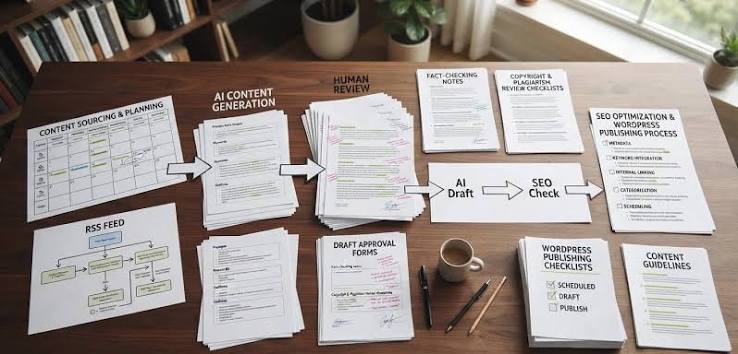
source feed or file → filter rules → draft post in WordPress → human edit → publish.
That structure is boring, and boring is good. I would not start with auto-publishing unless the content is low risk and clearly owned by you. The moment you want multiple sources, image downloads, or AI rewrites, the system becomes more likely to produce odd titles, broken embeds, or duplicated content blocks.
Here is the setup I would use for most serious sites.
- Create a dedicated category or custom post type for imported content, so it does not mix with manually written posts.
- Set all imports to draft status for the first 2 weeks.
- Add source attribution fields: source name, source URL, and import date.
- Use an SEO plugin to control canonical tags, titles, and indexing rules.
- Strip or replace anything that tends to break layouts, such as iframes, shortcodes, or untrusted HTML.
- Set a cap on daily imports, even if the feed produces more. Ten good items are better than 100 weak ones.
- Review one sample post on mobile and desktop before moving to publish status.
- Build an exception list for sources or posts that should never auto-publish.
There is also a media issue most guides gloss over. Pulling remote images automatically can create copyright and performance problems. Hotlinking images is fragile, and downloading every image can bloat your media library. If the source does not give you image rights, consult a professional before treating the image field as free inventory.
A reliable setup has a rollback plan. If the feed starts misfiring, you should be able to pause imports, bulk-switch imported posts back to draft, and disable the source without touching the rest of the site.
Quick check: If you cannot answer where each imported image comes from, who approves posts, and how to pause the pipeline, the setup is not ready.
Edge cases where the normal advice breaks down
Auto blogging looks straightforward until the source, the volume, or the content type changes. These are the places where the usual “just install a plugin” advice stops being useful.
-
Situation: the source updates 200 times a day.
What changes: Import frequency and server load matter more than plugin features.
What to do instead: Use a queue or automation platform with rate limits, and import only the items that truly matter. A 5-minute import loop may be too aggressive; hourly batching is often safer. -
Situation: the source content is behind a login or paywall.
What changes: Access rights and scraping risk become the core problem.
What to do instead: Do not rely on scraper plugins. Use official APIs, licensed feeds, or manual curation. If there is no permission, the technical path is the wrong path. -
Situation: you need to publish in multiple languages.
What changes: Translation quality and terminology consistency matter.
What to do instead: Separate the source language from the published language, use a review step, and keep localized slugs and metadata under control. Auto-translation without review is a bad idea for anything public-facing. -
Situation: your posts must include structured product or event data.
What changes: The post body is no longer enough; custom fields become essential.
What to do instead: Use WP All Import, custom post types, and Advanced Custom Fields or native meta fields so the data stays organized. -
Situation: the imported content is mostly opinion, commentary, or analysis.
What changes: A feed can supply facts, but it cannot supply judgment.
What to do instead: Import as drafts and attach a human editor step. If the whole value of the site is the angle, the automation should stop at collection. -
Situation: you run a small shared host.
What changes: Resource limits and cron reliability can break imports.
What to do instead: Use fewer sources, fewer scheduled tasks, and less frequent runs. If needed, move the automation off the site and push content in through the REST API on a schedule.
These are not rare edge cases in practice. They are the exact places where auto blogging projects drift from “useful” to “why is this broken every Tuesday?”
Quick check: If your setup involves paywalls, multiple languages, or structured metadata, the simple plugin route is probably too simple.
A setup path I would choose by use case
The right path changes by goal, and that is the part many articles flatten out. If you want a direct answer, here is the version I would choose in common real-world cases.
Building a niche news digest? Use Feedzy RSS Feeds or WP RSS Aggregator, keep imports as drafts, and publish only after a quick edit. That gives you speed without flooding the site.
For a product catalog or event database, use WP All Import with custom fields. Feed tools are the wrong fit because the data is structured, not editorial.
For an internal knowledge hub, use Make or n8n to bring in approved documents, then publish to a private WordPress area or custom post type. Here, search rank matters less than accurate indexing and permission control.
For an affiliate comparison site, I would keep automation limited to data imports and pricing updates, then write the comparison copy by hand. Product specs can be automated; the selling argument should not be.
For a site around licensed or partner content, use the partner’s feed or API and preserve attribution. This is one of the few cases where auto blogging can be completely sensible, because the source has already approved syndication.
The wrong path is usually the one that tries to do everything at once: scrape, rewrite, auto-tag, auto-image, auto-schedule, auto-share, and auto-rank. Each extra step adds a point of failure. A narrower system is easier to trust. Like a kitchen with one sharp knife, it does less but does it cleanly.
Quick check: If your main value is speed, import more automatically; if your main value is judgment, keep more steps manual.
FAQ
Can WordPress auto blogging hurt SEO?
Yes, if it creates thin, duplicate, or low-value pages. A small number of curated, edited imports is very different from mass-publishing copied content.
What is the easiest tool for auto blogging in WordPress?
For RSS-based setups, Feedzy RSS Feeds or WP RSS Aggregator are common starting points. For CSV or XML imports, WP All Import is usually the better fit.
Should auto-blogged posts be drafts or published automatically?
Drafts are the safer default. Auto-publishing only makes sense when the source is trusted, the content is low risk, and the formatting is predictable.
Can I auto blog from RSS legally?
Only if you have the right to republish the content or you are using excerpts in a way that fits the source’s terms. If permission is unclear, do not assume the feed makes it okay.
Is custom code better than plugins?
Only if you need specific rules, scale, or integrations that plugins do not handle well. For many sites, a plugin plus a review process is enough.
Final verdict
WordPress auto blogging is worth doing when the source is legitimate, the content is repetitive enough to structure, and you can control what reaches publish status. It is not worth doing when the plan depends on copying other publishers, ignoring quality checks, or hiding a weak content strategy behind automation.
If I had to reduce the whole guide to one line, it would be this: automate collection, not judgment. Let the system move data, tag posts, and schedule drafts. Keep a human between the source and the final post whenever trust, SEO, or legality can be affected.
That is the line that keeps the project useful instead of noisy.
Drafted with AI; not yet reviewed by a person.