




How do you avoid duplicate content in WordPress auto blogging?: A site can publish the same post twice in a morning and not notice for weeks. That is the…
Last updated: October 10, 2026
Key Takeaways
- Duplicate content usually starts when the same source item is imported twice or too much source text is reused.
- Stop repeats by rejecting known source IDs before WordPress creates a post.
- Make imported posts distinct by changing the content strategy, not just the wording.
- Canonicals, noindex, and permalink choices shape which version search engines treat as primary.
A site can publish the same post twice in a morning and not notice for weeks. That is the trap. Your WordPress auto blogging setup may keep pushing out near-identical posts, and one plugin setting will not fix it. You need a workflow that blocks duplicate titles, duplicate excerpts, duplicate source text, and duplicate URLs at four different points. Quick answer: use one importer, one dedupe key, one SEO layer, and one review step. Honestly, the safest route is usually to tighten source rules, force unique post generation, canonicalize or noindex low-value imports, and keep the same item from slipping in twice.
What actually causes duplicate content in WordPress auto blogging?

Duplicate content in WordPress auto blogging happens because the same source item enters your site more than once, or because your site republishes too much of the source page without enough change. When an importer pulls the same RSS item twice, the problem starts upstream. When it creates a new WordPress post from the same body text with only a swapped title, the trouble is in the rewrite and publishing rules.
The common failure points are pretty specific:
- The feed URL is polled every 5 to 15 minutes, but the plugin does not store a stable source ID.
- Title variations are treated as new items even when the source URL is identical, so check the plugin documentation or ask a developer before relying on titles alone.
- The plugin imports the full post, not a summary, so the body matches the original too closely.
- Tags, categories, and excerpts are generated from the same sentence patterns every time.
- The site exposes several URLs for the same post, such as
/post-name/,?p=123, category archives, and paginated attachments.
If you are importing from RSS, the big question is whether the plugin deduplicates by GUID, canonical URL, or a checksum. Can it explain that clearly? Consult the plugin documentation or a WordPress professional before trusting it on high-volume imports. Scraping pages instead of using a feed raises the risk even more, because page markup changes and post mirrors can look “new” when they are not. That gets slippery fast.
Here is the shortest useful way to sort the situation:
| Situation | Best Path | Why Other Options Fail |
|---|---|---|
| Same RSS item appears twice | Deduplicate by GUID and source URL before post creation | Post-status cleanup after publishing wastes crawl budget and still exposes duplicates |
| Multiple feeds syndicate the same source | Keep one primary feed and block the rest by source hash | “Unique title” rules miss body duplicates and near duplicates |
| Imported post is mostly copied text | Import only excerpts, then rewrite or summarize with original commentary | Full-text imports create thin pages that are hard to distinguish |
| Same post shows several URLs | Set one canonical URL and stop indexing parameter/archive variants | Deleting one URL does not fix the rest of the index |
A sensible plugin stack often includes one importer, one SEO plugin, and one cache layer. I would treat Yoast SEO, Rank Math, and AIOSEO as separate from the import problem itself; they help with canonical tags and noindex rules, but they do not stop bad imports on their own. For canonical handling, Google’s duplicate-content guidance and WordPress SEO plugin docs are the right starting points.
Sources: https://developers.google.com/search/docs/crawling-indexing/consolidate-duplicate-urls, https://yoast.com/help/canonical-url/ , https://rankmath.com/kb/canonical-url/
Quick check: name the source, import, post content, or URL layer. Then fix that layer.
How do you stop the same source from being imported twice?
You stop it by making the importer reject already-seen source identifiers before WordPress ever creates a post. Waiting until after publication means you are cleaning up a mess the crawler may already have found.
The most reliable dedupe key is not the title. It is the source GUID, canonical URL, or a hash of the source content plus source domain. If your plugin supports a “unique item” rule, turn it on. If it does not, choose a different importer; that missing feature is a red flag, not a small inconvenience, and you should confirm the workflow with the plugin docs or a WordPress professional before scaling it.
Use this path when the source itself is stable, such as a podcast feed, a news RSS feed, or a product listing feed:
- Pick one source field to serve as the unique ID, preferably GUID or canonical URL.
- Store that ID in WordPress post meta at import time.
- Reject any incoming item whose stored ID already exists.
- Set the feed polling interval to something sane, often 30 to 60 minutes, unless the publisher updates more often.
- Log rejected items so you can see whether the duplicates are true repeats or feed glitches.
- Keep only one importer pointed at that source unless the second one has a non-overlapping rule set.
If you are using a plugin like WP RSS Aggregator, Feedzy RSS Feeds, or WP Automatic, check whether it deduplicates before insert, not after. If you cannot find that in the settings or documentation, consult the plugin developer or a WordPress professional before using it for high-volume importing. For custom imports, a small amount of code that writes a _source_guid meta field is usually safer than hoping titles stay unique.
The one catch: GUIDs are not perfect when the source site changes systems or rewrites its feed. In that case, add a second rule using source URL normalization, stripping tracking parameters like utm_source and sorting query strings before comparison. If the source publishes the same item under a new GUID but the same URL, this second layer catches it. That backup matters.
Quick check: duplicates after feed refreshes mean pre-insert dedupe, not cleanup later.
How do you keep imported posts from looking like copies?

You keep imported posts from looking like copies by changing the content policy, not just the wording. Import full posts and then run a spinner over them, and the site may still read like a thin clone to a search engine and to a reader.
The standard advice to “rewrite the content” is incomplete. What matters is how much of the source survives, whether the imported piece has original context, and whether your page adds value beyond the source page. A 20% wording change is not a useful benchmark; a better benchmark is whether the post now has a distinct purpose.
Use this path when you want to publish curated content without competing head-on with the original:
- Import only the title, source URL, and a short excerpt of 1 to 3 paragraphs.
- Write a unique introduction that explains why the item matters to your audience.
- Add at least one original section, example, checklist, or local angle.
- Replace generic boilerplate tags and categories with topic-specific ones.
- Use quotes sparingly and only where they are central to the story.
- Mark the source clearly and link to it so the post looks curated, not stolen.
This approach is wrong for anyone trying to build a pure scraper site. It is also a poor fit if your traffic plan depends on ranking for the exact wording of someone else’s post. In that case, the honest answer is that you are trying to win a race against the original publisher, and that is usually a bad bet.
If you need a shortcut, summaries are safer than full imports. They reduce textual overlap and make it easier to add your own framing. Many WordPress auto blogging setups can pull the feed description instead of the full content; that one change often cuts duplicate risk sharply.
Do not ignore media either. Reusing the same featured image, alt text, and caption pattern across dozens of imports creates a second layer of sameness. If the image matters, crop it differently, add a source credit, or choose a distinct image from your own library.
Quick check: if the imported post could sit on the source site without embarrassing anyone, it probably needs more original material.
Which WordPress settings matter most for duplicate URLs?
Canonical tags, noindex rules, and permalink discipline matter most because they decide which version of a page search engines treat as the main one. Unique content can still get tangled if the URLs are messy, so consult a professional if you are unsure about the right setup.
The basic rule is simple: every imported post should have one preferred URL, one canonical tag, and no accidental duplicates created by archives, parameters, or attachment pages. Most people fix this in the SEO plugin, but the theme and the importer both shape the result.
If you run into duplicate URL exposure, follow this order:
- Set a clean permalink structure such as `/sample-post/` and avoid mixed formats.
- Make sure each post outputs a self-referencing canonical tag.
- Noindex thin archive pages if they add little value, especially author archives, tag archives, and date archives on small sites.
- Redirect attachment pages to the parent post or noindex them.
- Strip tracking parameters from indexed links where possible.
- Test a few sample URLs in Google Search Console’s URL Inspection tool.
This is where plugin choice matters in practical terms. Yoast SEO, Rank Math, and AIOSEO all handle canonicals and robots rules, but they differ in how easy they make archive control. If your theme generates multiple archive paths for the same imported content, turning off duplicate archives can do more than any rewriting tool, and a WordPress SEO specialist can help if the settings are unclear.
Sources: https://developers.google.com/search/docs/crawling-indexing/canonicalization, https://developers.google.com/search/docs/crawling-indexing/robots-meta-tag, https://yoast.com/help/should-you-noindex-tag-archives/
A common mistake is to noindex everything automatically. That can hide useful archive pages that help discovery. I would noindex tag pages only when they are thin and repetitive, and I would keep category pages indexable only if they have enough original intro text and clear topical value. That trade-off matters more on small sites than on large editorial sites.
Quick check: three URLs for one post means indexing trouble too.
If you are auto blogging at scale, what should the workflow be?
If you are publishing dozens or hundreds of imported posts, the only safe workflow is a staged pipeline with validation at each step. Scale magnifies tiny mistakes. One duplicate per day becomes 365 near-duplicates a year.
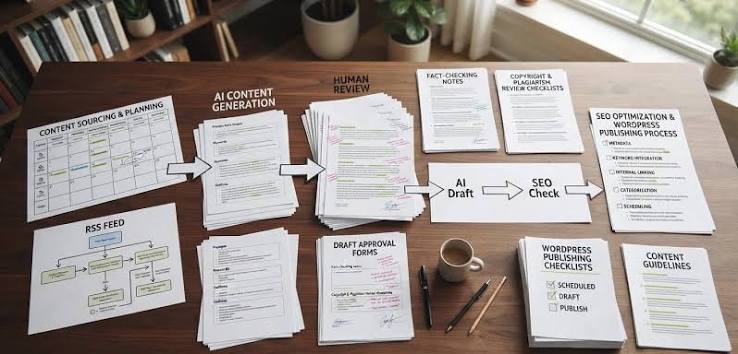
The order should be source check, import check, content check, then publish. Do not let the plugin skip straight from fetch to live post unless the source is already curated and the content is short.
Here is the workflow I would use for high-volume auto blogging:
- Create a source whitelist with only the feeds or pages you actually trust.
- Assign each source a stable ID and record it in post meta.
- Run a duplicate check before insert using GUID, canonical URL, or normalized hash.
- Limit each imported post to a unique excerpt, summary, or short excerpt plus original intro.
- Send new posts to draft or pending review first if the source quality varies.
- Publish only after checking canonical tags, excerpt length, and indexability.
At scale, I would rather have 20% fewer posts than 20% more copies. That is not a romantic answer, but it is the one that keeps a site cleaner over time. If your workflow cannot handle human review, then the content rules need to be stricter, not looser.
A practical benchmark: if two imported posts would differ only in title and date, they should not both go live. If a post has no original angle, no source note, and no unique value, it belongs in draft, not in the index.
Who is this not for? Anyone who wants a fully automatic “set it and forget it” content farm. That model is fragile, and it is exactly where duplicate content accumulates fastest.
Quick check: no review step, no rejection step. Too loose for scale.
What breaks the normal advice?
The normal advice breaks when the source changes often, the site spans multiple languages, the content is republished legally by agreement, or the importer is scraping pages that do not have reliable feeds. In those cases, simple “just dedupe by title” guidance fails fast.
| Situation | What changes | What to do instead |
|---|---|---|
| News feeds update the same story several times a day | Titles and excerpts can change without a new post | Deduplicate by source URL plus content hash, and keep update history in one post |
| Multilingual imports | Two translations may look like duplicates if the structure is similar | Separate by language code and canonicalize within each language only |
| Licensed republishing | You may be allowed to republish full text | Still add your own intro, set canonical rules if agreed, and avoid indexing the same post in multiple places |
| Scraping without feeds | Source IDs are unstable | Use normalized URL checks, page fingerprints, and manual approval for uncertain items |
| Product feeds with near-identical variants | Variants differ by SKU, color, or size | Treat the SKU as the unique key, not the product name |
| Old content imported from a legacy CMS | Dates, authors, and slugs often collide | Map old IDs into new post meta and redirect every old URL path carefully |
If the source republishes updates, do not create a fresh WordPress post every time unless the update truly deserves a new post. A better pattern is to keep one living post and append changes to it. That avoids a trail of duplicates and keeps the link equity in one place.
If the site is multilingual, the duplicate problem can be fake. Two pages can be semantically related without being duplicates in the SEO sense. The fix there is hreflang, not aggressive rewriting. For legal or licensed content, I would get the indexing rule in writing before assuming the right setup.
Quick check: versions, variants, or translations mean the rule must understand the structure.
Which tools and checks should you use before publish?
You should use one importer, one SEO plugin, and one crawl check before you trust anything live. Skip the crawl check, and you are guessing about duplicates instead of measuring them.
A practical pre-publish stack looks like this:
- Importers: Feedzy RSS Feeds, WP RSS Aggregator, WP Automatic, or a custom importer
- SEO: Yoast SEO, Rank Math, or AIOSEO for canonical and noindex controls
- Crawl check: Screaming Frog SEO Spider or a similar crawler to spot duplicate titles, duplicate meta descriptions, and repeated content blocks
- Search verification: Google Search Console URL Inspection and index coverage reports
If you have to pick one external standard to anchor the setup, use Google’s guidance on canonicalization and duplicate content handling, and pair it with a crawl tool like Screaming Frog for spot checks. That combination is usually enough to catch the most obvious problems before a post goes live.
Sources: https://developers.google.com/search/docs/crawling-indexing/canonicalization, https://www.screamingfrog.co.uk/seo-spider/
Drafted with AI; not yet reviewed by a person.